Responsive Ad Slot

Showing posts with label Internet Tips. Show all posts

How to Increase Alexa Rank for Your Website, Blog?

1 comment

Wednesday, May 14, 2014


Hello friends today we are sharing with you "How to increase Alexa Rank for your Website, Blog?"
Now days alexa has become a hot topic that how we can increase alexa traffic for a website or blog. My clients are also asking me what is the alexa rank of their website most of them are believing that alexa is ranking.

What is Alexa Rank?

How to Disable Facebook Messages from Non Friends

No comments

Friday, August 16, 2013


Login to your Facebook Account
Login to facebook
Before changing any security related to your Facebook, you first need to sign in to Facebook with valid username and password.
Click On Messages

hide facebook messages from non friends 1
On your left hand panel top, you can see “Messages” option, just click on that to change privacy setting for messages.
Click on Others
disable facebook messages from non friends 2
After clicking on “messages”, you will found 2 options namely “Inbox” and “Other”, choose “other” as shown above
Click ‘Edit Preferences’
disable facebook messages from non friends 3
Select blue color link as shown named “Edit preferences” to go further with disabling message option for non facebook friends.
Strict Filtering
disable facebook messages from non friends 4

In next window, you will found checkbox for “Basic filtering”, which is default option and if you select this option, you may get messages from people in your friendlist and non friends but who are somehow connected to you (people You may Know), while other option named “Strict Filtering” will give you messages only from friends and all other messages will go to “others” message folder and won’t disturb you at all. You can view those messages at your convenience.
So, I hope this tutorial would have cleared your doubt on Facebook security related to “messages” and you could have learned how to enable and disable Facebook message privacy for friends and non friends.
Ideally speaking, you should keep default option ON which is “Basic filtering” for Facebook message filtering preferences, because if some of your friend wants to contact you through message but he/she is not there in your friend list, you may loose his/her message by setting up “strict Filtering” and sometime this could create a major problem for you.
Anyways, share this article with your Facebook friends if you really find this interesting and informative in terms of learning disable Facebook messages for non friends or Facebook security for messages.

How can create Facebook icon on your computer's desktop

2 comments

Thursday, August 15, 2013

Facebook has been a very necessary schedule work for everybody. Most of the internet users go to Facebook as soon as they connect with the internet. Nowadays Facebook users have found being really lazy to go to web browser and type www.Facebook.com and then press Enter then again type log in details bla bla bla. If it was me I wouldn't bother to do these things. Instead I could either type only fb.com to go to Facebook or just create a desktop icon so that I don't need to type www.facebook.com again and again.

Make Facebook Life Easier:

  • Just type fb.com on browser to open Facebook OR,
Create a Facebook Icon On Your Desktop, so that you just need one click to go to Facebook.

Here we are going to show two ways to make a Facebook Icon on your desktop.

1.By Creating A Shortcut Icon Of Facebook URL.

3 Easy Steps To Create A Short cut Icon of Facebook on Desktop

  • Right-click on the desktop and select New>>Shortcut


  • Type "Facebook" and click "Finish". Done!!!


(Optional)Now a Facebook shortcut has been created on your desktop. If you like to change the picture of that shortcut then you can follow these easy steps.
  • Right click on that recently created Facebook Shortcut
  • Go to "Properties">>"web document"
  • Click on "Change Icon"
  • Select an Icon>>Press Ok >>Press OK. Now its Done!!!

2.By Installing A Google Chrome Extension (For Google Chrome User)

If you use Google Chrome as your web browser then this option is the best option for you.


  • Open Google Chrome and go to "Customize and Control Google Chrome" menu.
  • Go to "Tools" >>"Extensions"
  • Go down on the bottom of the page and click on "Get More Extensions".
  • On the Search Field type " Facebook". Now you can see a list of extensions. First one will be Facebook.
  • Click on "Add To Chrome"
Now you have created Facebook Extension for your Google Chrome browser.


  • Now reopen Google chrome and select>> "apps", you will see a facebook apps as in picture below.


    Now, Right-click on Facebook app Icon, Click on "Create a shortcut">>Select "Desktop" >>Click "Create"

    Now Enjoy Your Facebook Icon On Your Desktop!!!!!!♂♀


    source :- Missing Nepal

How to Delete Facebook Chat Massages At Once

No comments

Monday, July 29, 2013

Facebook is a social networking website, established in 2004, which is now the most widely used social networking website in the world with one billion users .

If you want to delete all your Facebook messages which you talk with your friends at once without spending time deleting them one after another, there are many ways which you can use to get it done. Chatting on Facebook will always get your Facebook inbox filled with numerous inbox messages which you may not have time to go through them again .

Also Read:- Update Blank Status on Facebook Profile.

Infact, Facebook should have added a feature that should store chat messages but I can’t really explain the reason why Facebook didn't  add this feature yet. The worse part of it, is that there is no way to mark these messages to delete all of them collectively am I right??

 Let How to delete Facebook Massages Using FireFox

To delete all your Facebook messages at once using Firefox, you should install Greasemonkey Firefox addon and then restart your browser. Once you finished installing GreaseMonkey Firefox, go to userscripts.org and install this script also.


  • After installing the script, you can login to your facebook account and go to facebook messages, now you should see a new “Delete All” button in your facebook inbox . 
  • When you click on the button, you will see a dialogue asking you to confirm that you want to delete all your messages. 
  • Confirming the selection will delete all your facebook normal messages and also facebook chat messages . 
With this method explained above, it will be easier for you to delete your facebook messages with a single click without going through any long process of deleting facebook messages. Just install GreaseMonkey onto your Firefox browser, go to userscript.org and install this script . Then you can be able to delete your Facebook messages with a single click . 


Source : Making Different (Tips And tutorials) 
Happy Bloging !! :)
Please like our facebook page and keep Visiting Our Blog .

Keep your "Password" difficult

2 comments

Friday, July 5, 2013

धेरै दिन पछी फुर्सद मा थिएँ आज के लेखौं झैँ लागिरहेको थियो। झट्ट दिमागले आज केहि Useful कुराहरु लेखौं भन्ने सोच्यो। के तपाइँ कैले आफ्नो कुनै पनि , मोबाईल , फेसबुक a/c , E-mail  password hack भएर टेन्सन भोग्नु भएको छ??? यदि नभए भोग्नु पनि नपरोस्। मेरो कामना छ। पासवर्ड भनेको चाबी हो चाबी , तपाईको locker को चाबी हरायो त केहि छैन अरुले भेटाएन भने नया चाबी बनाउन सक्नु हुन्छ यदि तेही चाबी कसैले चोर्यो भने के हुन्छ तपाइँ सजिलै अन्दाजा लगाउन सक्नु हुन्छ । तपाई को फेसबुक को पासवर्ड चोरी हुनु भनेको तपाइँ को जिन्दगि को चाबी चोरी हुनु जस्तै हो । त्यहाँ तपाईले आफ्नो सम्पूर्ण जानकारी राख्नु भएको हुन्छ त्यसलाई अरुले दुरू पयोग गर्दियो भने तपाईको दुरुपयोग हो । तेसैले यस्ता पासवर्ड कसैले चोर्न (Hack ) नसक्ने नसक्ने गरेर राख्नु पर्दछ । कुनै पनि Facebook होस् या G-mail होस् Yahoo होस् या Blog यस्ता Online सेवा सुबिधा का पास्वोर्ड Guess गरेर मात्रै छोरि हुने हैन कसैले Software को प्रयोग गरेर पनि छोरि रहेका हुन्छन ।
Normal पासवर्ड राख्नु भयो भने यस्ता Software ले सजिलै तपाई को पासवर्ड बताईदिन्छ ।
जस्तै -
Alphabet मात्रै
Number मात्रै
अनि आफ्नो फोन नम्बर ,  साथि हरुले Guess गरेर नि मिलाउछ्न ।
तेसैले जहिले पनि पासवर्ड राख्दा तेस्ता हैन यस्ता पासवर्ड राख्ने गर्नुहोस ।
@#189Aghj
*458#NlpS

यस्तै माथि देखाए जस्तै मिलाएर नम्बर, अक्षर हरु सानो ठुलो मिलाएर राख्नु भो भने software प्रयोग गरे पनि पत्ता लगाउन गारो पर्छ ।


यो पनि पढ्ने पो हो कि??

Happy Bloging !! :)
Back To HOME
Please like our facebook page and keep Visiting Our Blog .

How to change blogspot Address ??

2 comments

Wednesday, June 26, 2013

So if you have a blog in blogspot domain and have an address that is not much related to the topics you write, you can change it always from the blogger dashboard. There is no restriction from blogger about the number of times you can change the URL of your blog. So if you think the blog address is not an easily recognizable one or the blog address does not tell the real niche of the blog, you have the full freedom to change the blog address. The point we should remember is this facility depends on the availability of blog URLs. It means if the address you are seeking for is already taken, you cannot use that address for your blog.

Steps to Change Blogger Blog Address
  1. Log in to Blogger account

  2. Click on Settings

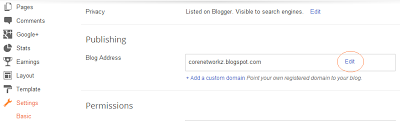
  3. Under basic settings you can see an edit button near blog address.
    how to change the address of a blogger blog

  4. Click edit and change the current blog name with the new name. Click on Save after completing the process.
  5. You have done. :) 
Happy Bloging !! :)
Back To HOME
Please like our facebook page and keep Visiting Our Blog .

Download Facebook album with one click

No comments

Tuesday, June 25, 2013

    Now you can download your Facebook friend's Any album's all photographs with one click . isn't it Great Idea????  Just go to this apps  facebook2zip   


 Step1: the picture above you'll soon be asked to login with Facebook app on the go
 Step2: Now you'd like to download the photo album from your friend in the picture above you can see an arrow pointing to the 2 Choose
Step3: Now select the album you want to download any
Step4: Just click the Download button and the position you want to save the photo album.

You might also Like>>>> 


Happy Bloging !! :)
Back To HOME
Please like our facebook page and keep Visiting Our Blog .

Download video and MP3 From Youtube

No comments

Saturday, December 8, 2012

Youtube मा  आफुलाई मनपर्ने गीतहरु छन् हेरियो भिडियो मनपर्यो आफ्नो mobile मा राख्न मन लाग्यो तर कसरि download गर्ने download गर्ने ठाउँ  त youtube ले दिएको छैन कसरि गर्ने त ???  समस्या पो पर्यो त।
केहि छैन धेरै software हरु छन् जसको मार्फत तपाइँ भिडियोहरु Download गर्न सक्नु हुन्छ तर झ्याऊ छन् । Download गर Install गर लिंक कपी पेस्ट गर छैन त झ्याऊ तर अर्को सजिलो उपाय म तपाई हरुलाई दिन गईरहेको छु।

तपाइँ को कम्प्युटर मा सर्ब प्रथम Fire Fox Browser हुन जरुरीछ Fire Fox Download गर्नुहोस। लिंक खोज्न गारो भए यहाँ तल Click गर्नुहोस Auto Download  हुनेछ।
Download


जब तपाई को कम्प्युटर मा Fire Fox Install भईसके पछी Open गर्नुहोस।
सबै भन्दा माथि Fire Fox को मेनु देख्नु हुन्छ। यस्तो


माथि Line मा गएर "Tools " भन्ने ठाउँ मा click गर्नुहोस अनि Add-Ons मा click गरिसके पछि अर्को Tab खुल्ने छ। त्यहाँ दाहिने पट्टि Search all add-ons भन्ने ठाउं मा Type गर्नुहोस "Easy youtube Video Downloader" Search गर्नुहोस। 

More   Install  मा click गर्नुहोस छोटो समय मै Install हुनेछ। 
Install भैसके पछी youtube को site मा जानुहोस youtube का कुनै भिडियो खोल्नुहोस ठ्याक्कै भिडियो को तल यस्तो देखिनेछ।
 Like को side  मा download भन्ने Option देखिन्छ। त्यहाँ click गर्नुहोस तपाइँ लाइ मनलागेको  भिडियोहरु गितहरु भिडियो सहित  MP3 मा पनि  Download गर्न सक्नुहुनेछ। 
Also Watch in Video 


Enjoy With Youtube Video
Happy Bloging !! :)
Back To HOME
Please like our facebook page and keep Visiting Our Blog .

फेसबुक बाट पैसा कमाउनुहोस (Earn Money From Facebook)

No comments

Tuesday, December 4, 2012

इन्टरनेट मा केहि बेर आखा के लगाउदै थिए एउटा वेब साईट सानो संसार डट नेट  मा यस्तो लेख थियो  । कस्तो थियो त लेख सरासर तल पढ्नुहोस । यहो हो लेख हेर्नुस त।

के तपाई फेसबुक चलाउनुहुन्छ ? पक्कैपनि जेजतिले ईन्टरनेट चलाउनुहुन्छ, उहाँहरुले कम्तिमा फेसबुक एकाउन्ट त पक्कै बनाउनुभएको छ होला । तर के तपाईले आफ्नो त्यहि फेसबुक अकाउन्टबाट पैसा कमाउन सक्छु भन्नेबारेमा कहिल्यै सोच्नुभएको छ ??

हो, ईन्टरनेटमा घुम्दै जाँदा एउटा यस्तो वेबसाईट -    FanSlave    फेला पर्यो, जसबाट तपाईहामी जस्ता फेसबुक प्रयोगकर्ताहरुले आफ्नो फेसबुक अकाउन्टबाट सजिलै पैसा कमाउन सक्छौँ । गाह्रो काम केहि गर्नु पर्दैन , जब हामीले त्यहाँ दिईएका फेसबुक फ्यान पेजहरु लाईक गर्छौ , उनीहरुले हाम्रो अकाउन्टमा पैसा जम्मा गर्दिन्छन् । भएन त मज्जा ?? (((यतिकै मा तपाई पढ्न नाछाद्नुस यो के हो कस्तो हो तल सबै उल्लेख गरिएको छ ।)))

के हो त FanSlave ?

FanSlave   एउटा त्यस्तो साईट हो जसले दिईएका फेसबुक पेज Like र ट्विटर अकाउन्ट Follow गरेबापत आफ्ना प्रयोगकर्ताहरुलाई पैसा दिन्छ ।
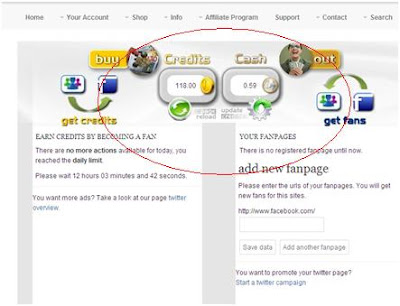
पेज लाईक गर्नासाथ FanSlave मा हामीले Credit (क्रेडिट) पाउँछौ । २०० क्रेडिट बराबर एक युरो ( €1 = रु. ११० ) हुन्छ । एउटा पेज लाईक गरेबापत ४ देखि ८ सम्म क्रेडिट पाईन्छ र हरेक दिन ३० ओटासम्म फ्यान पेजहरु लाईक गर्न सकिन्छ । साईटमा रजिस्टर गर्ने बित्तिकै ५० क्रेडिट (0.25 EURO) बोनसस्वरुप पाईन्छ ।
जब तपाईको अकाउन्टमा १५ युरो पुग्छ, तब उक्त रकम Paypal वा Payza मार्फत आफूले प्राप्त गर्न सक्नुहुन्छ ।

कसरी कमाउने FanSlave बाट पैसा ?

१. रजिस्टर गर्नका लागि   यहाँ जानुहोस्   ( के के गर्नु पर्छ सबै मा बताउदै जानेछु ) र तलको जस्तो पेज खुलिसकेपछि fanslave वा Create An Account मा क्लिक गर्नुहोस् ।

1

२. अति सजिलो छ यसमा खाता खोल्न सजिलो सबै काम नराम्रा हुन्छन नठान्नुस है ।  अब दिईएका Informations हरु भरेर I Accept Create An Account मा क्लिक गरी Sign Up पुरा गर्नुहोस् ।

2

३. रजिस्ट्रेसन सफल भईसकेपछि आफ्नो अकाउन्टमा Log In गर्नुहोस् र त्यहाँ दिएअनुसार आफ्नो फेसबुक अकाउन्ट Connect गर्नुहोस् ।
3

४. "Your Account" मेनुमा क्लिक गर्नुहोस् र "Facebook Overview" छान्नुहोस् ।

५. त्यहाँ लाईक गर्नुपर्ने फ्यान पेजहरु देख्नुहुनेछ । जब तपाईले क्लिक गर्नुहुन्छ , तिनिहरु नयाँ ट्याबमा खुल्छन् । ति पेजहरु लाईक गर्नुहोस् र त्यसपछि पुनः अगाडीकै FanSlave को पेजमा रहेको "Update" बटनमा क्लिक गर्नुहोस् ।
4

(सर्ब प्रथम त्यहाँ दिईएका पेज हरु Click  गर्नुहोस अरुकेही नगर्नुस अनि त्यो पेज लाइ like ठोक्नुस पैला अनि फेरी fanslave.comको पेज  मा आउनुहोस। ध्यान दिनुहोस है  त्यहाँ देखाईएको  UPDATE बटन क्लिक नगरेसम्म पैसा तपाईको एकाउन्टमा जम्मा नहुने हुदाँ क्लिक गर्न नर्बिसनुहोलानि है। )

Affiliate Program

FanSlave   को Affiliate Program मार्फत तपाईले आफ्नो कमाई अझ बढाउन सक्नुहुन्छ । आफूले Refer गरेका साथीहरुको आम्दानीको १५% तपाईले कमिसन स्वरुप प्राप्त गर्नुहुन्छ । उदाहरणका लागि तपाईले रिफर गरेको एकजनाले १०० क्रेडिट बनाएमा तपाईले १५ क्रेडिट पाउनुहुन्छ । त्यसैले जति धेरै जनालाई रिफर गर्नुहुन्छ, तपाईको आम्दानी त्यती धेरै हुने सम्भावना हुन्छ । लौहेर्नुस डबल मज्जा।

अन्त्यमा,

घरी यो पेज , घरी त्यो पेज गर्दै व्यर्थैका पेजहरु लाईक गरीरहनुभन्दा दिईएका केहि पेजहरु लाईक गरेर अनलाईनबाट पैसा कमाउन पाउनु पक्कै पनि उपयोगि कुरा हो । फेसबुकका अन्य कामहरुबाट दिनको ५ मिनेट समय छुट्ट्याएर केहि आम्दानी गर्न तपाई पनि आजै सुरु गरिहाल्नुहोस् । ढुक्क हुनुहोस्, लाखौँ प्रयोगकर्ताहरुले उपयोग गर्दै आएको FanSlave शतप्रतिशत विश्वाशिलो साईट हो ।

यदि तपाई लाइ कैले मेरो a /c 15 यूरो होला जस्तो लग्यो र पैसा को वास्ता गर्नु भएन भने अर्को फैदा नि छ .... तपाइँ को कुनै पेज छ भने तपाई को पैसा बाट  Fan किन्न नि सक्नु हुन्छ। fan किन्ने भन्दा खेर तपाइँ को पेज सहरे गर्नु हो र लिके गर्न तपाइको खाता मा अरुको पजे like गर्न भनिए जस्तै तपाइँ जस्तै अरु मेम्बर लाइ तपाई को पेज पठाऊछ Fabslave.com   ले
केहि समस्या आईपरेमा तलको कमेन्ट बक्स प्रयोग गर्न सक्नुहुनेछ ।

Type anywhere in Nepali language

1 comment

Monday, September 10, 2012

To many people ask me how to type Nepali language online or offline??
Here are few steps that will install (Google Nepali Input)  in your Computer .
First Step 1.  You need  To go this links 


You'll see this this type image below


You can also directly download from here click Below links

Read also :- Nepali Font For Mobile.

Now tick mark in Nepali again tick mark on " I agree to the google Terms of service and Privacy Policy." then Click Download 

Now Go to Downloads of your browser and double click on   ' googlenepaliinputinstall.exe '  Open downloaded file


This step will install google nepali input on your machine by poping up a window shown below.

Now another window will pop up for End User Licence Agreement, just check on I agree and then click on next to complete the installation.


Wait for some while and the installation will complete, but remember you need internet connection for the complete installation. OK

Read this too :- Internet Download Manager (IDM) - FREE


How to use Google Nepali Input IME

Now for type Nepali language . At the right hand side of your windows Buttom on the menu bar there is language status bar on the corner side near the clock, check Nepali as your language to use Google Nepali Input. Also you can choose 'A' for English and 'अ' for Nepali instantly to jump between english and nepali language.

I hope after reading this post everyone will start using Google Nepali Input. This is very easy and really cool.
We can create MS word or other document in Nepali font. Also You can type on online chatting . have fun .


Image credit - Nepali Unicode Installation 


How to Update Kaspersky Antivirus Offline (without Internet Connection)

3 comments

Thursday, September 6, 2012

You Want to update your "Kaspersly " Antitrust Without Internet ?? If you don’t have an internet connection at one or several computers but you still want to keep your antivirus updated, this should help you. In order to update  databases  signature and application modules of Kaspersky Antivirus or Internet Security 2012 you can use a special update utility, which should be run manually from another computer or from a flash drive which is connected to the computer with the internet connection.
Kaspersky_Offline_UpdateLet know step-by-step Guide to Update Kaspersky Offline Here
  1. Download the Kaspersky 2012 Database Updater to your computer. Cliking the link. 
  2. After downloading Kaspersky 2012 Database Updater, extract the contents of it to a new folder of a flash drive that is connected to a computer with internet.
  3. From the extracted folder run the file Updater.bat (double-click the file to run it).
  4. Once the file is started, the following window appears on the screen:
Don't Miss
© all rights reserved with MeroConcept
Made with By Mero Design